Entry point
clippet -e work codex resume --lastRun Claude Code, Codex, QoderCLI, pi, Copilot CLI and Antigravity CLI as whichever account you choose: interactively, headless, or side by side.
CLIppet gives every run its own identity. An env is a real HOME directory with its own login, sessions and history, so switching accounts means switching envs instead of logging out. Bring the Codex accounts you already keep in Cockpit Tools, sub2api or CLIProxyAPI, pass any flag through to the agent, and drive it all from the terminal, a TUI or Python.
clippet -e work codex resume --last: resume --last goes to Codex as is$HOME.Envs. An env is a HOME of its own: one login, its sessions, its history.
$ clippet env create work --from-current   # your config, none of your logins
$ clippet -e work codex login              # log in once, inside the env
$ clippet -e work codex                    # from now on, always this account
$ clippet -e work codex resume --last      # the rest goes to Codex as is

# two envs, two accounts, at the same time
$ clippet -e personal codex                # in one terminal
$ clippet -e work codex                    # and in another
Accounts. Put a Codex account from another tool into an env.
$ clippet auth list cockpit                       # what Cockpit Tools holds
$ clippet env import work cockpit --account 2     # linked to account #2
$ clippet env import bob ./backup.json --account bob   # an export
$ clippet -e work codex                           # Codex, logged in as #2

# or skip the env: a throw-away one for one run
$ clippet -c sub2api-account.json codex
Headless. Run once and print the answer.
$ clippet -e work codex -p "Explain the failing test"

# arguments after the prompt go to codex exec
$ clippet -e work codex -p "Fix it" -c model_reasoning_effort=high

# a project's .clippet.json can pick the env for you
$ clippet codex -p "Summarize the open TODOs"
Python. The same envs, side by side, with structured results.
from clippet import ClippetRunner, AgentRequest, get_environment
from clippet.config.detector import create_adapter_with_second_home

runner = ClippetRunner(max_workers=2)
for env in ("work", "personal"):            # two envs, two accounts
    home = get_environment(env)["home_dir"]
    runner.register(env, create_adapter_with_second_home(home, "codex"))

request = AgentRequest(task_prompt="Fix the flaky test", workspace_dir=".")
results = runner.execute_parallel({"work": request, "personal": request})
# each AgentResult: output_text, tool_calls, usage, session_idHands your terminal to the agent, running in the env. Everything after the agent name, apart from CLIppet's own -p, goes to the agent unchanged, so its own subcommands and flags keep working.
clippet -e work codex resume --lastRuns the agent once with -p and prints its final answer. Arguments after the prompt go to the agent's own headless command, such as codex exec.
clippet -e work codex -p "Fix it"One run() for every CLI and a structured result back: the answer from all four, plus tool calls, usage and session id from Codex and Claude Code. ClippetRunner runs several side by side, and run_async streams each line as it comes.
runner.execute_parallel(
    {"work": req, "personal": req})
No env? Point -c at a credential file for a throw-away env, or pick base to run in your own HOME.
CLIppet reads Codex logins from the tools people use to manage them, turns each into Codex's own auth.json, and puts it in an env or a throw-away one. Pick one with --account: an index, an e-mail, a label or an account id.
cockpit
The live, encrypted account store, read only. An env linked to one of its accounts pulls the newest login before every launch from the CLI or the TUI.
cockpit_auto_backup_*.json
Backups and data-transfer files. Only the Codex accounts in them are read.
sub2api-account-*.json
Accounts with platform: openai. Claude and Gemini entries are left alone.
codex-*.json
The Codex token files CLIProxyAPI keeps, one account in each.
~/.codex/auth.json
A ChatGPT login or an API key, passed through as it is. A HOME or CODEX_HOME folder works too.
{"id_token", "access_token", "refresh_token"}
Bare tokens, also nested under tokens or credentials. The access token must be an OpenAI JWT.
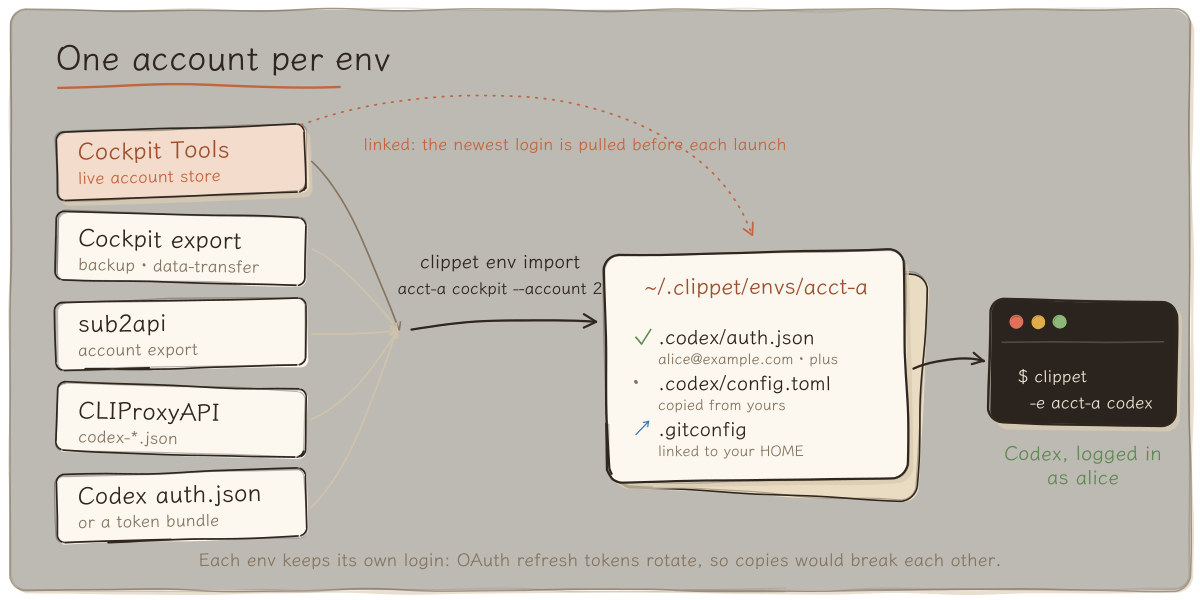
--with-auth. OAuth refresh tokens rotate, so the first copy that refreshes would break the others.clippet env sync pulls the newest login on demand.auth.json, or keeps it under ~/.clippet/refreshed/.Each env keeps its own login, sessions, MCP state and history. Two envs can run at once, as two different accounts.
$ clippet -e personal codex   # one terminal
$ clippet -e work codex # another, at the same timeList its Codex accounts and link an env to one of them.
A .clippet.json holds only references, so plain clippet codex picks the right account there.
Mark envs in the TUI, send one prompt, and watch every run stream in.
Subcommands and options after the agent name reach the agent unchanged. Only a -p right after the name is CLIppet's, and -- passes even that on.
Run any of the four CLIs with one interface, and watch Codex's events as they arrive.
The TUI lists each env's recent Codex sessions and resumes one in its own folder.
Point Codex at sub2api or another OpenAI-compatible gateway with its own key and config.
env status shows the account, plan, token expiry and source. The TUI's Checks place lists the agent versions and the variables isolation drops.
clippet --help for the launch options, and clippet env --help or clippet auth --help for the rest.
Accounts and environments
Plain clippet in a terminal opens it: your envs and their accounts, recent Codex sessions, streamed runs, project pins and checks. T switches between ink and paper, ? lists every key.
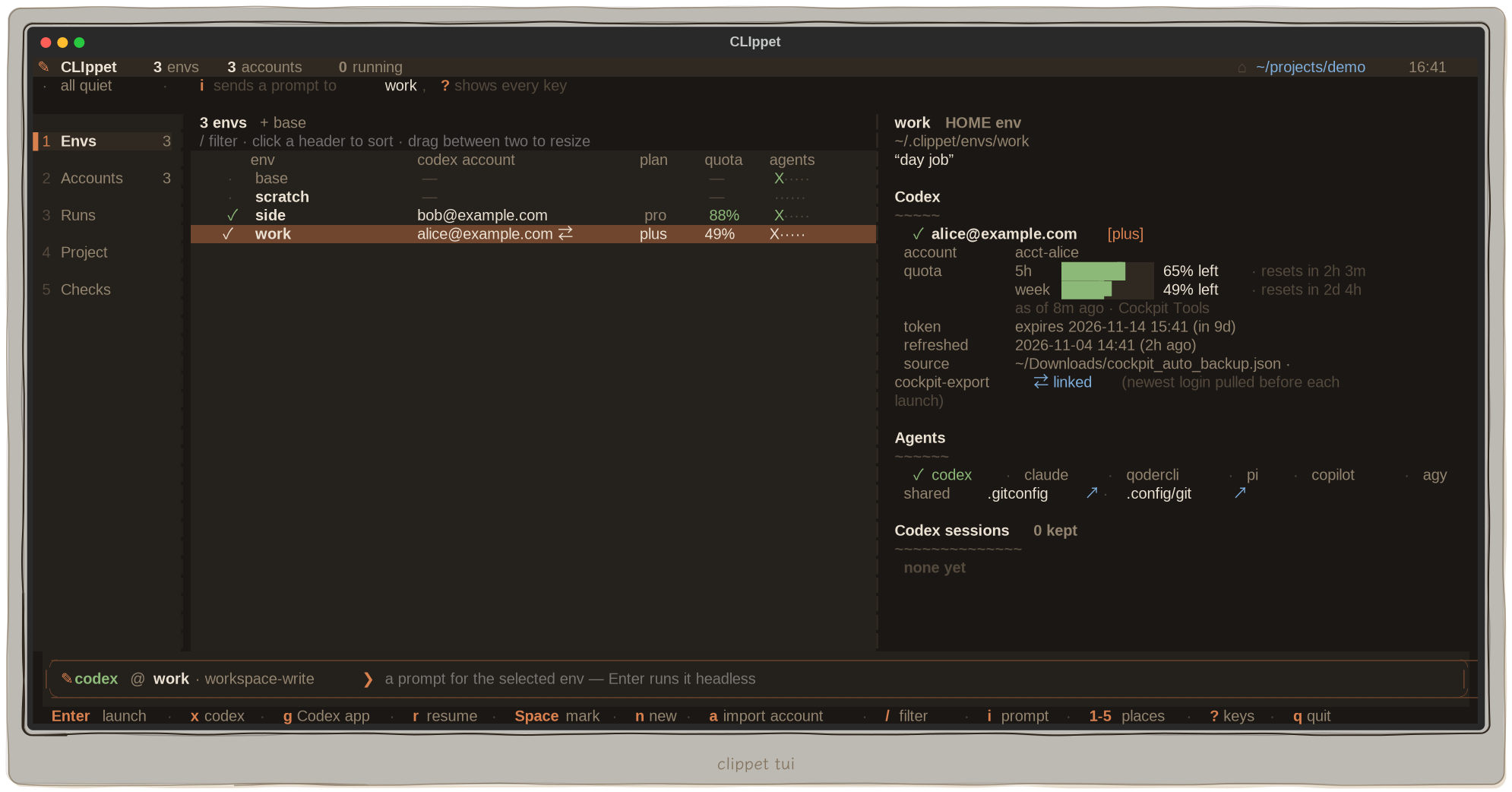
Envs: every env with its Codex account, plan and the quota it has left.
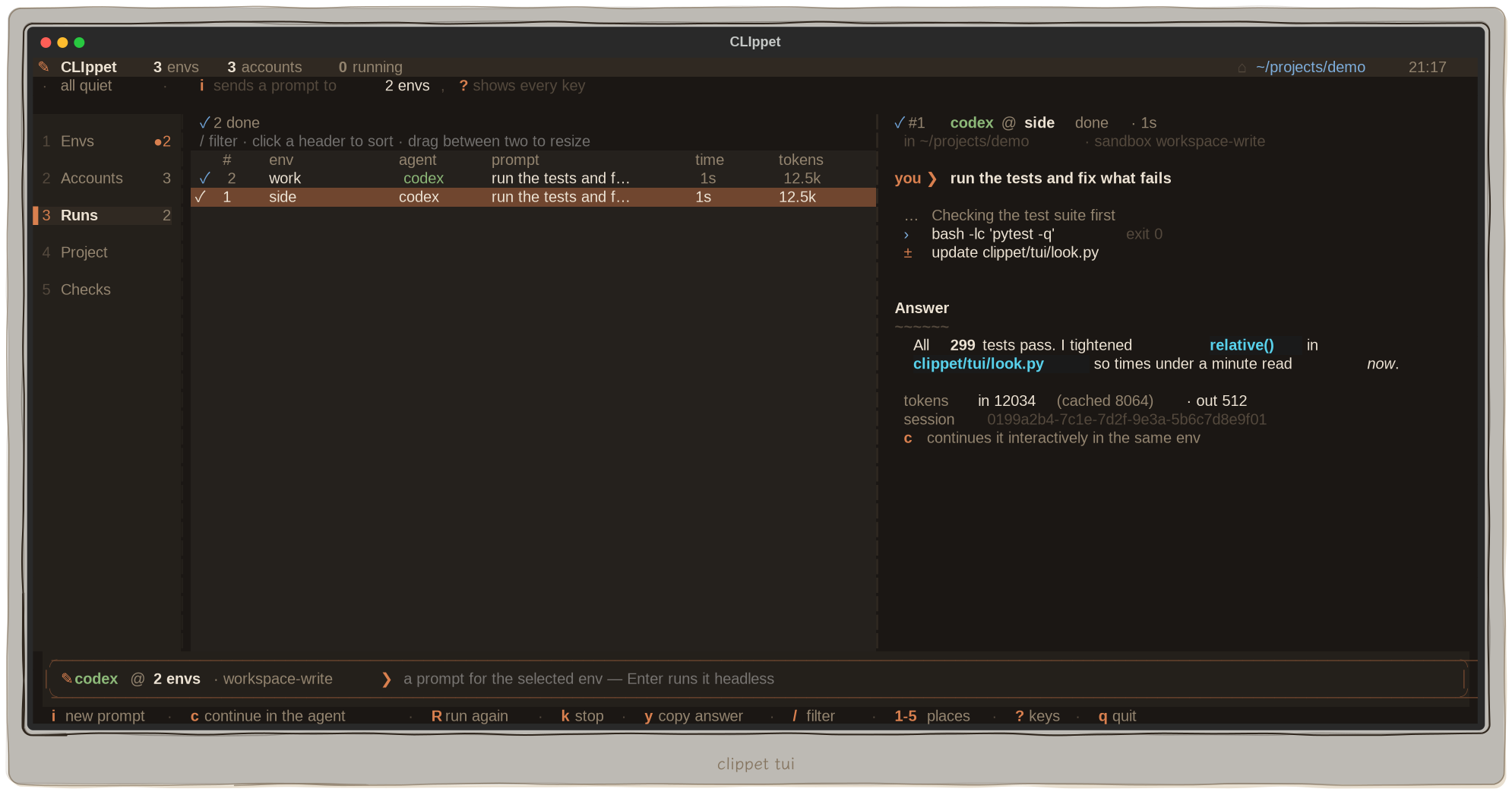
Runs: one prompt streamed in two envs.
Each env's Codex account, plan, quota left, linked source and recent sessions.
Every account in Cockpit Tools and in the files you add, the quota it has left, and which env holds it.
Prompts you sent, streamed: commands, edits, the answer, tokens.
The workspace's .clippet.json and what each agent resolves to.
Agent CLIs and versions, CLIppet's paths, and the variables isolation drops.
Five parts, one question each: where the run starts, who it runs as, where that login comes from, how CLIppet talks to the agent, and where the agent runs.
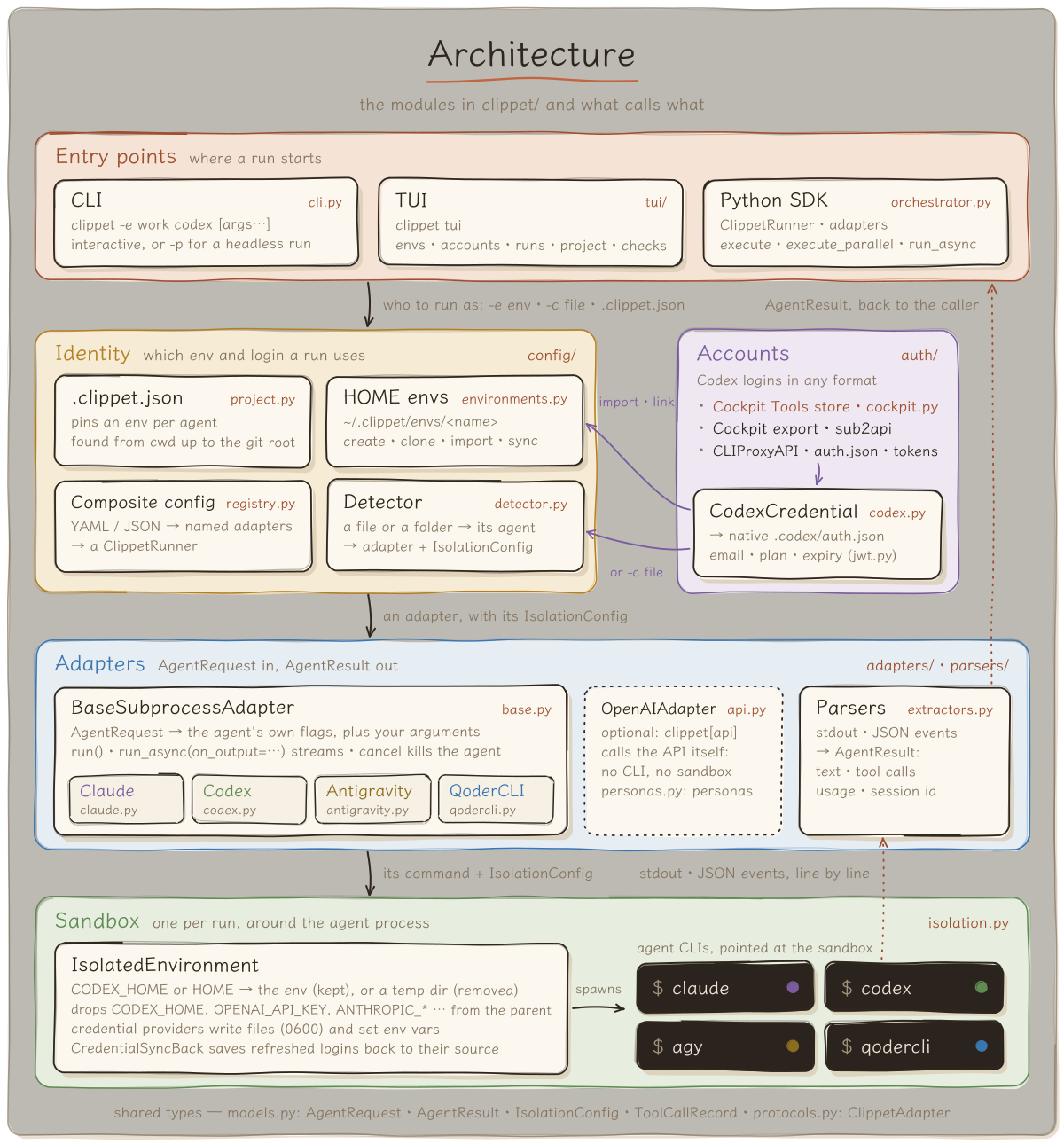
cli.py · tui/ · orchestrator.pyThe CLI, the TUI and the Python SDK drive the same layers.
config/An env, a credential file or a .clippet.json pin decides the env and the login.
auth/Codex logins in any supported format become one CodexCredential.
adapters/ · parsers/An AgentRequest becomes the agent's own command; its output becomes an AgentResult.
isolation.pyThe agent's config folder (CODEX_HOME, …) or its $HOME points at the env, identity variables are dropped, credentials are written 0600 and refreshed logins are saved.
Python 3.10 or newer, and the agent CLIs you already use. The extras add the terminal UI and reading the Cockpit Tools store.
pip install "clippet[tui,cockpit] @ git+https://github.com/FanBB2333/CLIppet.git"Install only the agents you want to run; CLIppet starts the CLIs you already have.
Copy your agent configuration (not your logins) into a new env, then log in inside it, or import an account you already have.
clippet env create work --from-current
clippet -e work codex login
# or: clippet env import work cockpit --account 2Launch Codex in the env, pass any of its flags through, run it headless, or open the TUI to see every env at once.
clippet -e work codex
clippet -e work codex -p "Explain this repository"
clippetCLIppet chooses the HOME, the login and the environment an agent starts with. It is not a security sandbox, and it does not copy logins between envs unless you ask it to.
-c; the other agents log in inside an env.pip install "clippet[tui,cockpit] @ git+https://github.com/FanBB2333/CLIppet.git"Then run clippet in a terminal: the TUI shows your envs, the Codex account in each, and their recent sessions.